Post Deployment Validations
-
Check Components in Kubernetes:
- Ensure all Yeedu components are successfully deployed in the Kubernetes cluster.
- Verify the status and health of each component, including but not limited to:
- Deployment pods
- Services
- ConfigMaps
- Secrets
- Use Kubernetes commands such as
kubectl get pods,kubectl get services, etc., to inspect the status of the deployed components.
-
Access UI from Browser:
- Open a web browser.
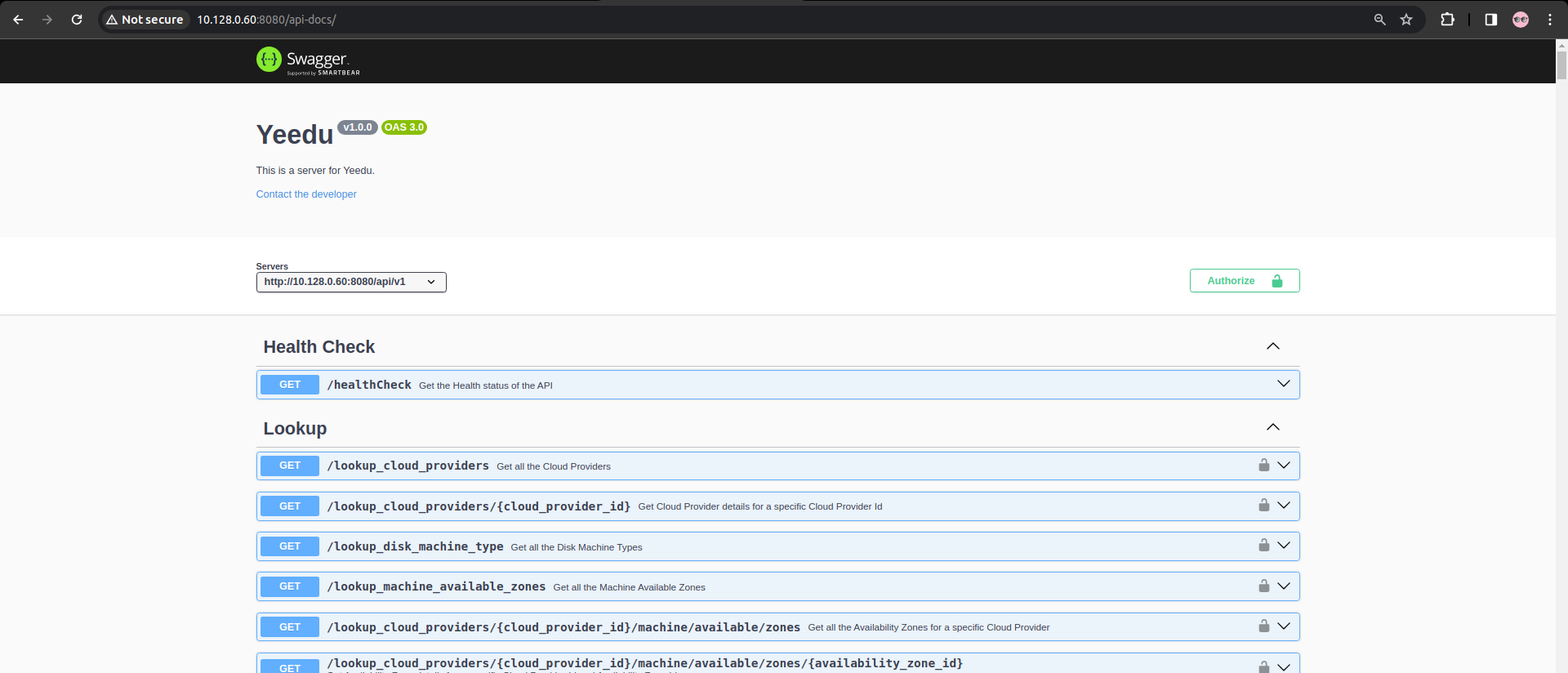
- Navigate to the URLs associated with the Yeedu UI components, such as:
- Yeedu REST API
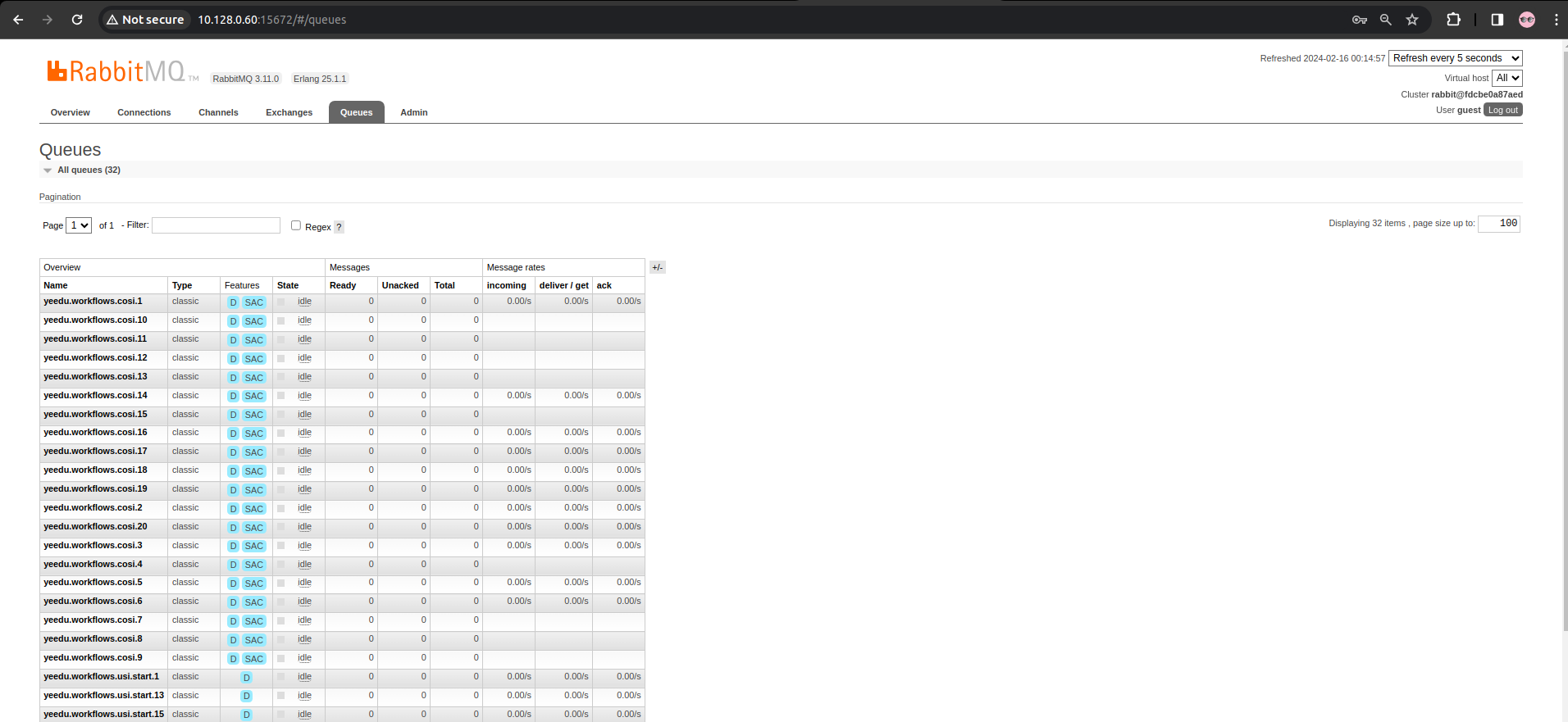
- RabbitMQ UI
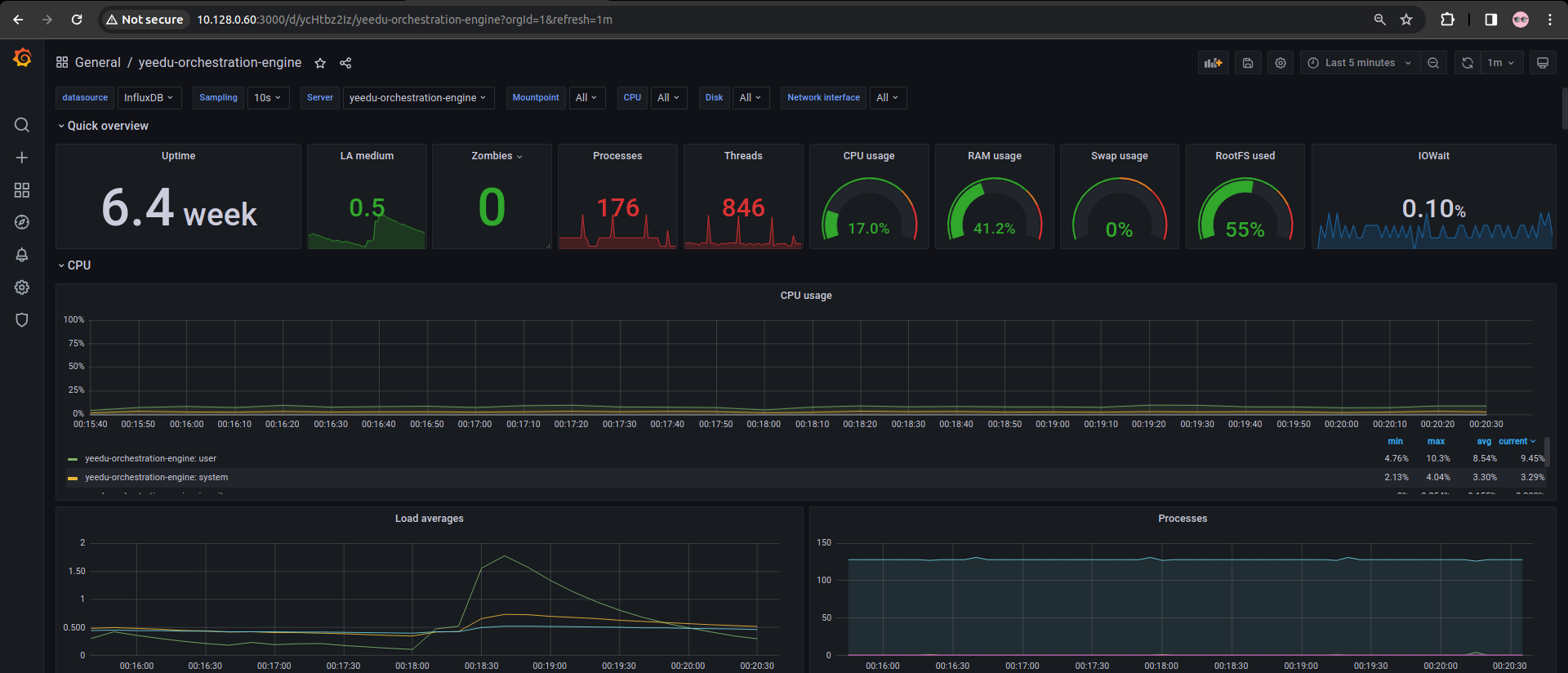
- Grafana
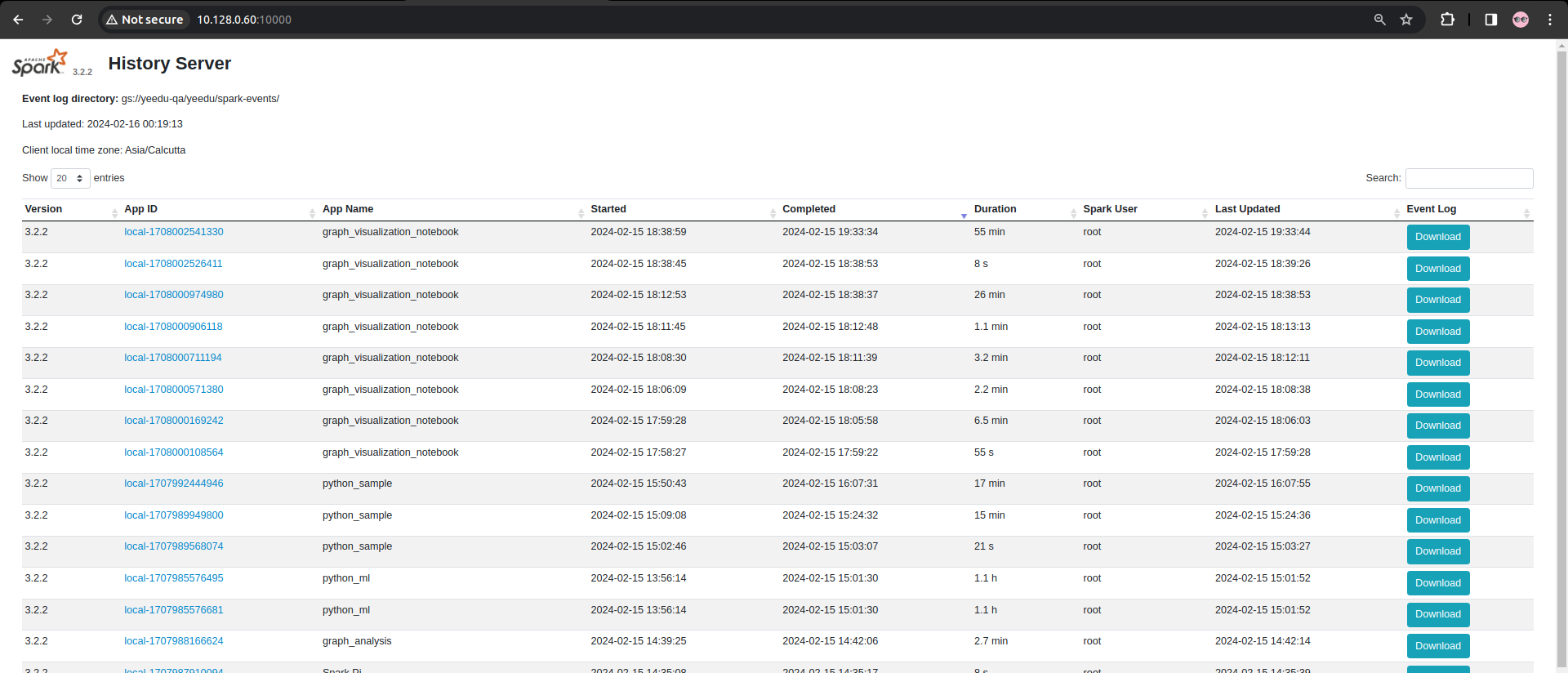
- Ensure that the UIs are accessible and responsive, indicating successful deployment and availability of Yeedu Runtime services.
1. Components in Kubernetes
Validate the created components such as configmaps, services, Persistent Volume Claims, Persistent Volumes, Deployments, Pods, Ingress, Statefulsets. The outcome should depict something as shown below.
1.1. ConfigMaps
The following should be the output when you list configmaps:
$ kubectl get configmaps -n $YEEDU_SYSTEM_KUBERNETES_NAMESPACE
NAME                                                DATA   AGE
ingress-nginx-controller                            5      23m
kube-root-ca.crt                                    1      31d
tcp-services                                        9      23m
yeedu-aws-retention-json                            1      4m10s
yeedu-azure-retention-json                          1      4m9s
yeedu-cloud-credential-json                         1      4m12s
yeedu-core-ingress-controller                       1      16d
yeedu-docker-registry-credential-json               1      4m11s
yeedu-gcp-retention-json                            1      4m8s
yeedu-grafana-config-files                          1      3m56s
yeedu-grafana-config-files-all                      1      4m1s
yeedu-grafana-config-files-grafana-home-dashboard   1      4m
yeedu-grafana-config-files-influxdb                 1      4m4s
yeedu-grafana-config-files-ini                      1      3m59s
yeedu-grafana-config-files-ldap                     1      4m3s
yeedu-ldap-files                                    1      4m7s
yeedu-rabbitmq-files                                2      4m6s
yeedu-rabbitmq3-plugins-conf                        1      3m1s
yeedu-rabbitmq3-server-conf                         2      3m1s
yeedu-redis-files                                   2      4m5s
yeedu-telegraf-config-files                         1      3m55s
1.2. Services
You should be seeing the below output when you list services
$ kubectl get svc -n $YEEDU_SYSTEM_KUBERNETES_NAMESPACE
NAME                                                           TYPE           CLUSTER-IP     EXTERNAL-IP   PORT(S)                                                                                                                                                              AGE
ingress-nginx-controller                                       LoadBalancer   10.0.226.237   10.4.6.156    80:30593/TCP,443:30796/TCP,3000:32196/TCP,10000:31674/TCP,5432:31148/TCP,389:31589/TCP,6379:31539/TCP,5672:30978/TCP,15672:32195/TCP,8080:31028/TCP,8086:31665/TCP   25m
ingress-nginx-controller-admission                             ClusterIP      10.0.19.225    <none>        443/TCP                                                                                                                                                              25m
yeedu-grafana-clusterip                                        ClusterIP      10.0.120.102   <none>        3000/TCP                                                                                                                                                             2m57s
yeedu-history-server-clusterip                                 ClusterIP      10.0.183.238   <none>        10000/TCP                                                                                                                                                            2m56s
yeedu-influxdb-clusterip                                       ClusterIP      10.0.190.71    <none>        8086/TCP                                                                                                                                                             2m55s
yeedu-ldap-clusterip                                           ClusterIP      10.0.118.52    <none>        389/TCP                                                                                                                                                              5m12s
yeedu-metadata-db-clusterip                                    ClusterIP      10.0.201.94    <none>        5432/TCP                                                                                                                                                             5m13s
yeedu-rabbitmq3                                                ClusterIP      10.0.144.204   <none>        5672/TCP,15672/TCP,15692/TCP                                                                                                                                         4m36s
yeedu-rabbitmq3-nodes                                          ClusterIP      None           <none>        4369/TCP,25672/TCP                                                                                                                                                   4m36s
yeedu-rabbitmq3-rabbitmq-messaging-topology-operator-webhook   ClusterIP      10.0.89.93     <none>        443/TCP                                                                                                                                                              4m54s
yeedu-redis-clusterip                                          ClusterIP      10.0.231.179   <none>        6379/TCP                                                                                                                                                             5m13s
yeedu-restapi-clusterip                                        ClusterIP      10.0.46.19     <none>        8080/TCP                                                                                                                                                             2m55s
1.3. Persistent Volume Claims
You should be seeing the below output when you list pvc
$ kubectl get pvc -n $YEEDU_SYSTEM_KUBERNETES_NAMESPACE
NAME                                   STATUS   VOLUME                                     CAPACITY   ACCESS MODES   STORAGECLASS          AGE
persistence-yeedu-rabbitmq3-server-0   Bound    pvc-13b9c5c5-a07b-4c92-b40b-6439d6a55793   20Gi       RWO            yeedu-storage-class   5m13s
persistence-yeedu-rabbitmq3-server-1   Bound    pvc-6a46ff4c-3afe-480b-a878-3b1654e3bfcd   20Gi       RWO            yeedu-storage-class   5m13s
persistence-yeedu-rabbitmq3-server-2   Bound    pvc-d15ab56e-67dc-440b-82f4-74fe114dbd49   20Gi       RWO            yeedu-storage-class   5m13s
yeedu-influxdb-volume                  Bound    pvc-0742419c-7a7c-4853-b5af-93909c72136d   200Gi      RWO            yeedu-storage-class   3m34s
yeedu-ldap-pvc                         Bound    pvc-14a45bb0-c7bd-4924-bdc0-06b1db854a29   10Gi       RWO            yeedu-storage-class   5m51s
yeedu-ldap-slapd-pvc                   Bound    pvc-ee59d86c-97fb-4b99-8b3b-aeb309773faa   10Gi       RWO            yeedu-storage-class   5m51s
yeedu-metadata-db-pvc                  Bound    pvc-3feee8a7-67c6-4f0a-be18-ec814b4bd101   20Gi       RWO            yeedu-storage-class   5m51s
yeedu-reactors-logs-volume             Bound    pvc-b718c992-9ef7-4c0d-8b45-1968ef8e6918   100Gi      RWO            yeedu-storage-class   3m35s
yeedu-redis-volume                     Bound    pvc-9a1352cd-a588-455d-894d-0807c5d95c88   50Gi       RWO            yeedu-storage-class   5m51s
1.4. Persistent Volumes
You should be seeing the below output when you list pv
$ kubectl get pv -n $YEEDU_SYSTEM_KUBERNETES_NAMESPACE
NAME                                       CAPACITY   ACCESS MODES   RECLAIM POLICY   STATUS   CLAIM                                        STORAGECLASS          REASON   AGE
pvc-0742419c-7a7c-4853-b5af-93909c72136d   200Gi      RWO            Delete           Bound    yeedu/yeedu-influxdb-volume                  yeedu-storage-class            3m57s
pvc-13b9c5c5-a07b-4c92-b40b-6439d6a55793   20Gi       RWO            Delete           Bound    yeedu/persistence-yeedu-rabbitmq3-server-0   yeedu-storage-class            5m37s
pvc-14a45bb0-c7bd-4924-bdc0-06b1db854a29   10Gi       RWO            Delete           Bound    yeedu/yeedu-ldap-pvc                         yeedu-storage-class            6m14s
pvc-3feee8a7-67c6-4f0a-be18-ec814b4bd101   20Gi       RWO            Delete           Bound    yeedu/yeedu-metadata-db-pvc                  yeedu-storage-class            6m15s
pvc-6a46ff4c-3afe-480b-a878-3b1654e3bfcd   20Gi       RWO            Delete           Bound    yeedu/persistence-yeedu-rabbitmq3-server-1   yeedu-storage-class            5m37s
pvc-9a1352cd-a588-455d-894d-0807c5d95c88   50Gi       RWO            Delete           Bound    yeedu/yeedu-redis-volume                     yeedu-storage-class            6m15s
pvc-b718c992-9ef7-4c0d-8b45-1968ef8e6918   100Gi      RWO            Delete           Bound    yeedu/yeedu-reactors-logs-volume             yeedu-storage-class            3m58s
pvc-d15ab56e-67dc-440b-82f4-74fe114dbd49   20Gi       RWO            Delete           Bound    yeedu/persistence-yeedu-rabbitmq3-server-2   yeedu-storage-class            5m37s
pvc-ee59d86c-97fb-4b99-8b3b-aeb309773faa   10Gi       RWO            Delete           Bound    yeedu/yeedu-ldap-slapd-pvc                   yeedu-storage-class            6m14s
1.5. Deployments
You should be seeing the below output when you list deployments
$ kubectl get deployment -n $YEEDU_SYSTEM_KUBERNETES_NAMESPACE
NAME                                                   READY   UP-TO-DATE   AVAILABLE   AGE
ingress-nginx-controller                               1/1     1            1           28m
yeedu-grafana                                          1/1     1            1           5m56s
yeedu-history-server                                   1/1     1            1           5m56s
yeedu-influxdb                                         1/1     1            1           5m55s
yeedu-ldap                                             1/1     1            1           8m12s
yeedu-metadata-db                                      1/1     1            1           8m12s
yeedu-rabbitmq3-rabbitmq-cluster-operator              1/1     1            1           7m54s
yeedu-rabbitmq3-rabbitmq-messaging-topology-operator   1/1     1            1           7m54s
yeedu-reactors-cosi                                    1/1     1            1           5m56s
yeedu-reactors-logs-sync                               1/1     1            1           3m44s
yeedu-reactors-monitor                                 1/1     1            1           5m57s
yeedu-redis                                            1/1     1            1           8m13s
yeedu-restapi                                          1/1     1            1           5m55s
1.6. Pods
You should be seeing the below output when you list pods
$ kubectl get pods -n $YEEDU_SYSTEM_KUBERNETES_NAMESPACE
NAME                                                              READY   STATUS      RESTARTS     AGE
ingress-nginx-admission-create-fzvnz                              0/1     Completed   0            28m
ingress-nginx-admission-patch-g565f                               0/1     Completed   0            28m
ingress-nginx-controller-6fdbb469b9-nv8bh                         1/1     Running     0            28m
init-yeedu-l5dfp                                                  0/1     Completed   0            6m39s
yeedu-grafana-7f5d7fbf5b-8lqmw                                    1/1     Running     0            6m30s
yeedu-history-server-787fb4f97b-lbxk7                             1/1     Running     0            6m30s
yeedu-influxdb-6f6bc94f87-tcx5v                                   1/1     Running     0            6m29s
yeedu-ldap-7bcf697d47-5d52m                                       1/1     Running     0            8m46s
yeedu-metadata-db-fdb6c5947-lpjcg                                 1/1     Running     0            8m46s
yeedu-rabbitmq3-rabbitmq-cluster-operator-5d8f54d4f6-f76h8        1/1     Running     0            8m28s
yeedu-rabbitmq3-rabbitmq-messaging-topology-operator-f76d8zlpk7   1/1     Running     0            8m28s
yeedu-rabbitmq3-server-0                                          1/1     Running     0            8m9s
yeedu-rabbitmq3-server-1                                          1/1     Running     0            8m9s
yeedu-rabbitmq3-server-2                                          1/1     Running     0            8m9s
yeedu-reactors-cosi-74c76d9bb8-d99pt                              1/1     Running     0            6m30s
yeedu-reactors-logs-sync-c89dbd6f6-fb875                          1/1     Running     0            4m18s
yeedu-reactors-monitor-7db7485768-qhh8l                           1/1     Running     0            6m31s
yeedu-redis-85d95dff5f-q75sk                                      1/1     Running     0            8m47s
yeedu-restapi-7767fbbdd6-55zm9                                    1/1     Running     0            6m29s
1.7. Statefulsets
You should be seeing the below output when you list statefulsets
$ kubectl get statefulset -n $YEEDU_SYSTEM_KUBERNETES_NAMESPACE
NAME                     READY   AGE
yeedu-rabbitmq3-server   3/3     9m38s
1.8. Secrets
You should be seeing the below output when you list secrets
$ kubectl get secret -n yeedu
NAME                                                           TYPE                             DATA   AGE
ingress-nginx-admission                                        Opaque                           3      16d
sh.helm.release.v1.yeedu-grafana.v1                            helm.sh/release.v1               1      3h9m
sh.helm.release.v1.yeedu-history-server.v1                     helm.sh/release.v1               1      3h9m
sh.helm.release.v1.yeedu-influxdb.v1                           helm.sh/release.v1               1      3h9m
sh.helm.release.v1.yeedu-ingress.v1                            helm.sh/release.v1               1      3h32m
sh.helm.release.v1.yeedu-init-third-party.v1                   helm.sh/release.v1               1      3h12m
sh.helm.release.v1.yeedu-init.v1                               helm.sh/release.v1               1      3h9m
sh.helm.release.v1.yeedu-ldap.v1                               helm.sh/release.v1               1      3h11m
sh.helm.release.v1.yeedu-metadata-db.v1                        helm.sh/release.v1               1      3h11m
sh.helm.release.v1.yeedu-rabbitmq3.v1                          helm.sh/release.v1               1      3h11m
sh.helm.release.v1.yeedu-reactors-cosi.v1                      helm.sh/release.v1               1      3h9m
sh.helm.release.v1.yeedu-reactors-log-sync.v1                  helm.sh/release.v1               1      3h7m
sh.helm.release.v1.yeedu-reactors-monitor.v1                   helm.sh/release.v1               1      3h9m
sh.helm.release.v1.yeedu-redis.v1                              helm.sh/release.v1               1      3h12m
sh.helm.release.v1.yeedu-restapi.v1                            helm.sh/release.v1               1      3h9m
yeedu-certs                                                    kubernetes.io/tls                2      3h37m
yeedu-image-pull-secret                                        kubernetes.io/dockerconfigjson   1      3h12m
yeedu-ingress-ingress-nginx-admission                          Opaque                           3      22d
yeedu-nginx-ingress-ingress-nginx-admission                    Opaque                           3      22d
yeedu-rabbitmq3-default-user                                   Opaque                           7      3h11m
yeedu-rabbitmq3-erlang-cookie                                  Opaque                           1      3h11m
yeedu-rabbitmq3-rabbitmq-messaging-topology-operator-webhook   kubernetes.io/tls                3      3h11m
1.9. Ingress Services
You should be seeing the below output when you list ingress services
$ kubectl get svc -n yeedu
NAME                                 TYPE           CLUSTER-IP     EXTERNAL-IP   PORT(S)                                                                                                                                                              AGE
ingress-nginx-controller             LoadBalancer   10.0.226.237   10.4.6.156    80:30593/TCP,443:30796/TCP,3000:32196/TCP,10000:31674/TCP,5432:31148/TCP,389:31589/TCP,6379:31539/TCP,5672:30978/TCP,15672:32195/TCP,8080:31028/TCP,8086:31665/TCP   6m35s
ingress-nginx-controller-admission   ClusterIP      10.0.19.225    <none>        443/TCP                                                                                                                                                              6m35s
1.10. Ingress Pods
You should be seeing the below output when you list Ingress Pods
$ kubectl get pods -n yeedu
NAME                                        READY   STATUS      RESTARTS   AGE
ingress-nginx-admission-create-fzvnz        0/1     Completed   0          5m25s
ingress-nginx-admission-patch-g565f         0/1     Completed   0          5m25s
ingress-nginx-controller-6fdbb469b9-nv8bh   1/1     Running     0          5m26s
2. Access from Browser
2.1. RabbitMQ
2.2. History Server
2.3. Grafana
2.4. Rest-API