Cloud Environment
The Cloud Environment ties together your Credentials, Networks, and Bootdisks into a single, cohesive deployment target for Yeedu clusters.
Overview
You can manage your Cloud Environments by navigating to Settings > ADMIN > Cloud Environment.
The Cloud Environment table displays all existing environments with the following key details:
- ID & Name: The identifier for the environment.
- Cloud Provider: The target cloud (e.g., AWS, GCP, Azure, OCI, OnPrem).
- Zone: The specific region or zone for deployment.
- Network Config: The associated network configuration.
- Cloud Project: The cloud project ID or subscription.
- Credential: The associated authentication credential.
- Boot Disk Image: The selected boot disk image to use.
- Created By & Modified By: Auditing information regarding who manages this environment.
Creating a Cloud Environment
To create a new Cloud Environment, you must have already configured the following prerequisites:
- Credentials: Appropriate access credentials for your cloud provider.
- Networks: A defined network topology (VPC, Subnet).
- Bootdisks: A compliant machine image.
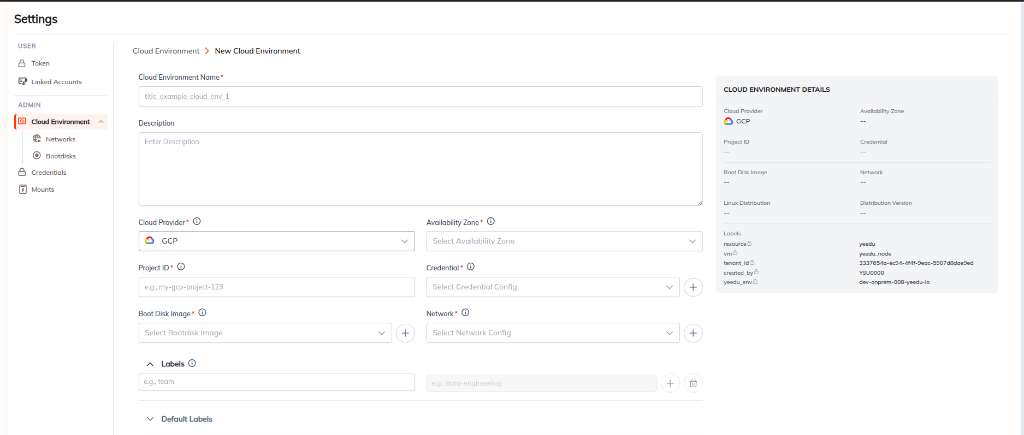
Once these components are ready, you can create a new Cloud Environment:
- Click the + Cloud Environment button.
- Fill out the New Cloud Environment form:
- Cloud Environment Name: A unique title for this environment (e.g.,
title_example_cloud_env_1). - Description: An optional text block to describe the purpose of this environment.
- Cloud Provider: Select the target provider (e.g., GCP).
- Availability Zone: Choose the specific region/zone where resources should be deployed.
- Project ID: The cloud project or subscription identifier.
- Credential: Select the pre-configured credential from the dropdown.
- Boot Disk Image: Select the pre-configured OS image.
- Network: Select the pre-configured VPC and Subnet setup.
- Labels: Define key-value pairs (e.g.,
team: data-engineering) that will be applied to all resources provisioned under this environment. - Default Labels: System-managed default tags (e.g.,
tenant_id,created_by,yeedu_env).
- Cloud Environment Name: A unique title for this environment (e.g.,
Note: As you fill out the form, the Cloud Environment Details sidebar will automatically populate to give you a summary of your configuration before saving.
- Save your configuration. This environment will then be available when provisioning new Yeedu clusters and workspaces.